

Endpoint
https://api.bilanc.co/mcpSign-in
OAuth — you authenticate in the browser with your normal Bilanc login
- “How has our PR cycle time changed over the last three months, by team?”
- “Which squads have the highest AI adoption rate, and did their PR throughput move with it?”
- “Show me the PRs that have been open longest in the payments repo.”
- “What’s our workflow success rate this quarter versus last?”
- “Which files in the checkout service churn the most, and what’s in them?”
What the server exposes
The Bilanc MCP server is read-only, and exposes eight tools in three groups.Analytics — SQL over your marts schema
Your assistant calls
describe_marts_schema first, then writes SQL against tables like pull_requests, pull_request_reviews, pull_request_commits, pull_request_files, issues, release_details, workflow_runs, ai_copilot, team_users, and user_metrics.
query_marts is deliberately narrow. Exactly one SELECT (or WITH … SELECT) per call, no trailing semicolon. Table names are unqualified — the schema search path is preset, and a schema or database prefix is rejected, as are writes, DDL, multiple statements, tables outside the whitelist, and information_schema.
get_benchmarks compares your organisation with every other organisation on the platform. For each metric it returns a platform_average (the mean of the per-organisation values) and quartiles: for each variant (total; per_day, per_week, per_month; per_user; per_user_per_day, per_user_per_week, per_user_per_month) an object mapping "1"–"4" to the upper bound of that quartile when organisations are ordered ascending, so a value at or below "1" is in the bottom 25% and a value above "3" is in the top 25%. Averages, rates and ratios only carry the total variant. Each row also says how to reproduce your own number with query_marts (source_table, date_field, row_filter, value_expression, plus a methodology field and your data_start_date), and carries lower_is_better: true for average cycle time, average PR size and rework rate, false for counts, and null for volume totals such as summed lines changed. The cohort is anonymous — the tool never reports how many organisations are being compared, and a metric whose period has fewer than 12 organisations comes back with suppressed: true and no quartiles.
Code — read-only inspection of your repositories
What the sandbox holds. Each code tool reads the repository’s default branch as of the last sync, which runs every two hours, and only repositories active since 2026-01-01 are synced. It is a snapshot for reading, not a checkout — nothing your assistant does here touches your real repositories. The sandbox is scoped to your organization and covers the repositories connected to Bilanc.
Repository settings — GitHub configuration outside the files
Your permissions come with you. The server signs you in as you. For
describe_marts_schema and query_marts, row and column access is enforced per user in PostgreSQL, so the assistant can only read data your Bilanc account is already allowed to see; get_benchmarks returns nothing tenant-specific at all. Nothing is writable — no tool can modify your Bilanc data, repos, or tickets.Claude Code (CLI)
Add the server, then authenticate from inside Claude Code.--scope user makes it available in every project on your machine. Use --scope project instead to write it into the repo’s .mcp.json and share it with your team (each person still signs in individually).
Then start Claude Code and run:
.mcp.json in your repo root:
Claude.ai
Bilanc is added as a custom connector.- Open Settings, and under Customize click Connectors.
- Click Add → Add custom connector.
- Set Name to
Bilancand Remote MCP server URL tohttps://api.bilanc.co/mcp. - Under Advanced settings, leave OAuth Client ID and OAuth Client Secret empty — Bilanc registers a client for you automatically.
- Under Connection methods, leave Individual sign-in on, so each member signs in to Bilanc with their own account.
- Click Add, then Connect and sign in to Bilanc.
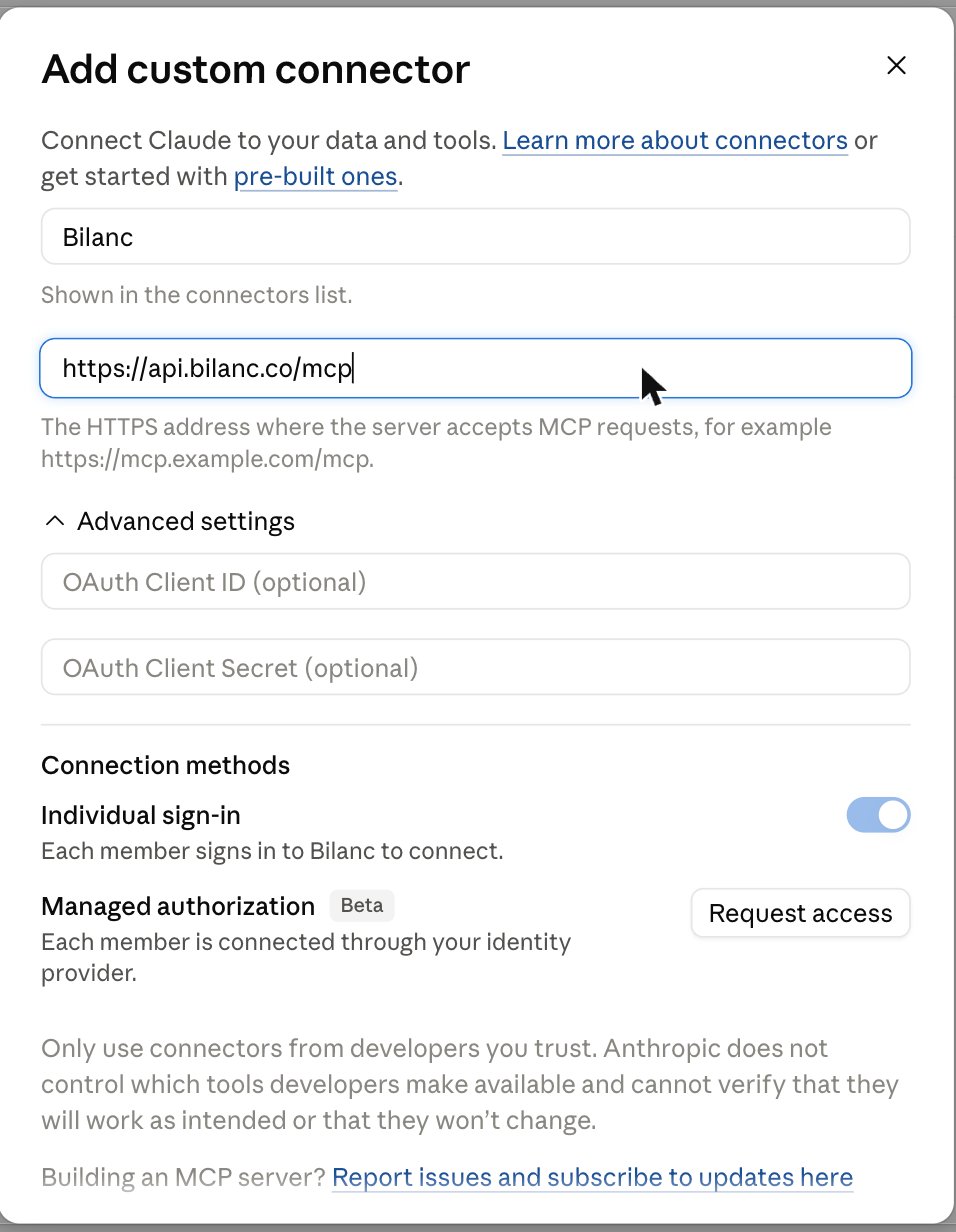
Adding Bilanc as a custom connector in claude.ai. Leave the OAuth client fields empty and keep Individual sign-in on.
ChatGPT
In ChatGPT, MCP servers are added as plugins (previously called connectors), and custom ones require developer mode. 1. Turn on developer mode. Go to Settings → Security and login → Developer mode and switch it on. On Business and Enterprise workspaces, a workspace owner may need to allow developer mode first. 2. Create the plugin. Open Plugins from the sidebar and click the + button, then fill in the New Plugin dialog:- Name:
Bilanc - Connection: leave it on Server URL and enter
https://api.bilanc.co/mcp - Authentication: OAuth
- Registration method should be Dynamic Client Registration (DCR). This is selected automatically. (CIMD shows as unavailable — Bilanc doesn’t advertise it, which is expected.) The Auth, Token, Registration, and Resource URLs are discovered from the server and shouldn’t need editing.
- Under Default scopes,
read:martsshould be ticked. - Under OpenID support, untick “OIDC enabled”. It is on by default, and it must be off.
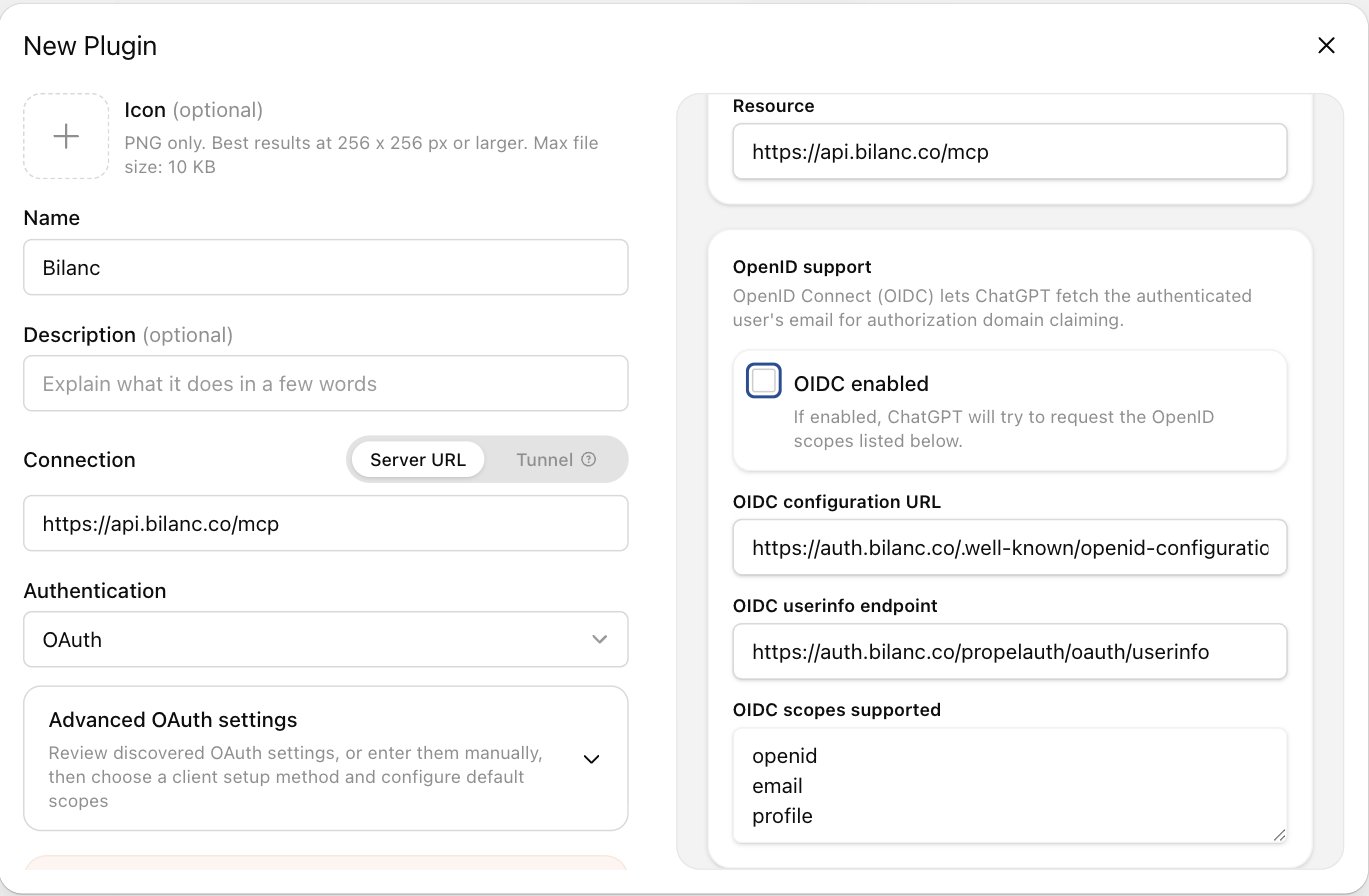
The New Plugin dialog in ChatGPT — Authentication set to OAuth, and 'OIDC enabled' unticked under OpenID support.
Codex CLI
codex mcp login opens your browser to sign in to Bilanc. Confirm it worked with codex mcp list.
The equivalent entry in ~/.codex/config.toml:
Older Codex versions need remote MCP support switched on explicitly. If
codex mcp add --url isn’t recognised, upgrade Codex, or add this to ~/.codex/config.toml:Gemini CLI
Add the server to~/.gemini/settings.json (or .gemini/settings.json in a project):
/mcp list to confirm the server and its tools are loaded.
Gemini CLI’s OAuth flow needs local browser access and receives the redirect on
http://localhost:7777/oauth/callback, so run it on a machine where you can open a browser.Cursor
Cursor reads MCP servers from a JSON file. Use~/.cursor/mcp.json to make Bilanc available in every project, or .cursor/mcp.json in a repo to share it with your team (each person still signs in individually):
mcp.json for you to paste the block above into.
Save the file and bilanc appears in the MCP server list with a Needs login state. Click it and your browser opens to sign in to Bilanc and approve access. Once it completes, the entry turns green and lists the eight tools.
Then just ask in Agent mode — Cursor picks the tools up automatically. Toggle the server off in the same panel if you don’t want it available in a given chat.
Cursor’s MCP list has a per-server tool cap, and Bilanc only ships eight tools, so they all load. If you have several MCP servers connected and Bilanc’s tools don’t appear, turn off the ones you’re not using for that chat.
OpenCode
opencode mcp auth opens your browser to sign in to Bilanc and approve access. OpenCode sees the 401, discovers the authorization server, and registers a client dynamically — there’s nothing to fill in. The token is stored in ~/.local/share/opencode/mcp-auth.json and refreshed for you. Confirm with opencode mcp list, which shows the server and its auth status.
Global or project
Passing--url always writes to your global config, ~/.config/opencode/opencode.json, making Bilanc available in every project.
To choose, run opencode mcp add with no arguments. Inside a git repository its first prompt is Location:
- Current project — writes to
opencode.jsonin the repo root, so the server is shared with your team (each person still signs in individually) - Global — writes to
~/.config/opencode/opencode.json
bilanc), a type (Remote), and the URL (https://api.bilanc.co/mcp). Answer Yes to Does this server require OAuth authentication? — it defaults to No — and No to Do you have a pre-registered client ID?, since Bilanc registers one for you.
Either way, you can write the entry by hand instead — opencode.json in a repo root for the project, or ~/.config/opencode/opencode.json for every project:
opencode mcp logout bilanc.
If the connection fails,
opencode mcp debug bilanc prints the OAuth flow step by step — discovery, registration, and token exchange — which is usually enough to see where it stopped.Devin
Devin adds remote MCP servers from its Customize page. An admin adds Bilanc once at the organization scope, and each member then connects with their own Bilanc account.Adding a custom MCP needs Devin’s Manage MCP Servers permission. If you don’t see Add custom MCP, ask an admin, or use Suggest MCP Integration on the same tab to request it.
- Open Customize → MCPs and click Add custom MCP.
- Set Server name to
Bilanc, then under Connection change Transport type from STDIO to HTTP and set Server URL tohttps://api.bilanc.co/mcp. - Set Authentication method to OAuth. Leave OAuth credentials empty — Bilanc registers a client for Devin automatically.
- Set Access to Personal so every member signs in to Bilanc as themselves, then click Add.
- Back on the MCPs tab, click Connect on the Bilanc row and sign in to Bilanc. Bilanc’s tools are available in every new session once connected.
- To check it, open the server’s configuration page and click Test tools — Devin connects and lists the eight Bilanc tools. Or start a session and ask an engineering-data question; you’ll see it call
describe_marts_schemathenquery_marts.
Choosing Organization access instead shares one connection with everyone, so Devin would query Bilanc as whoever connected it. Use Personal so each member’s own Bilanc permissions apply.
Unattended sessions and automations
OAuth needs a person to complete the sign-in, so a Bilanc server with Personal access stalls in a session nobody is watching, such as a scheduled automation. For those, add a second custom MCP with Authentication method set to Auth Header, header keyAuthorization, and value Bearer <key>, where <key> is a personal API key from your Bilanc dashboard under Settings → API Keys. Devin then acts as that user, in every session the server is enabled for. That means the key’s owner’s Bilanc permissions apply to everyone who can use it, so create it under a dedicated automation account whose access is scoped to what those automations need, keep the OAuth server above for interactive sessions, and treat it like any other shared credential. Organization-scoped keys don’t work here — the server has to resolve the caller to a Bilanc user.
Devin CLI
The Devin CLI runs on your own machine and keeps its own MCP config, so it’s set up like the other CLIs:devin mcp login opens your browser to sign in to Bilanc. Add --scope user to make it available in every project, or --scope project to share it through the repo. Confirm with devin mcp list, and re-authenticate later with devin mcp logout bilanc followed by devin mcp login bilanc.
Hermes
hermes mcp login opens your browser to sign in to Bilanc. The token is cached at ~/.hermes/mcp-tokens/bilanc.json and reused until it needs refreshing.
hermes mcp add writes the server into ~/.hermes/config.yaml, under mcp_servers. The equivalent entry, if you’d rather edit the file directly:
client_id and client_secret out — Bilanc supports dynamic client registration, so Hermes registers itself.
Check it with hermes mcp test bilanc, and use hermes mcp configure bilanc if you want to narrow which of the eight tools Hermes loads. If you edit the config during a session, run /reload-mcp rather than restarting.
Hermes’ OAuth flow needs a local browser for the redirect. On a headless or remote host, use its paste-back flow, forward the callback port over SSH, or set
oauth.redirect_uri to a proxied callback — see Connection details for the API key alternative.Connection details
For any other MCP client, or if you’re debugging a connection:Troubleshooting
The server shows 'needs authentication' or returns 401
The server shows 'needs authentication' or returns 401
Your access token has expired or was never issued. Re-run the client’s auth step —
/mcp in Claude Code, /mcp auth bilanc in Gemini CLI, codex mcp login bilanc in Codex, opencode mcp auth bilanc in OpenCode, hermes mcp login bilanc in Hermes, devin mcp login bilanc in the Devin CLI, Needs login on the server in Cursor’s Tools & Integrations panel, Connect on the Bilanc row under Customize → MCPs in Devin, or Connect on the connector in claude.ai and ChatGPT.ChatGPT can't finish setting up the plugin
ChatGPT can't finish setting up the plugin
Almost always OIDC. Open the plugin’s Advanced OAuth settings and untick OIDC enabled under OpenID support, or delete it and create it again with OIDC off. Also confirm Registration method is Dynamic Client Registration (DCR) and the client ID and secret are blank.
The assistant says it can't see a team, repo, or member
The assistant says it can't see a team, repo, or member
The server enforces your Bilanc permissions. If you can’t see something in the dashboard, the assistant can’t see it either. Ask a Bilanc admin to widen your access — see User Management.
A repository is missing from code_list_repos
A repository is missing from code_list_repos
Only repositories active since 2026-01-01 are synced into the code sandbox, and the sync runs every two hours, so a repository connected in the last couple of hours won’t be there yet. The tools also only ever see the default branch — ask about a feature branch and the assistant is reading
main.query_marts rejected my assistant's SQL
query_marts rejected my assistant's SQL
The validator accepts exactly one read-only
SELECT per call. The usual causes are a trailing semicolon, two statements in one call, a schema-qualified table name (marts.pull_requests rather than pull_requests), or a table that isn’t in the whitelist. Ask the assistant to call describe_marts_schema first — it rejects anything that tool doesn’t list.I need this on a headless machine or in CI
I need this on a headless machine or in CI
The client flows above are all browser-based OAuth, which needs a machine you can open a browser on. Without one, point your client at the endpoint with a personal API key instead —
Authorization: Bearer <key>, generated from your Bilanc dashboard under Settings → API Keys. Organization-scoped keys won’t work here. In OpenCode that means setting "oauth": false alongside an Authorization header, otherwise it still tries the browser flow when it sees a 401. In Devin, add a custom MCP with Auth Header authentication — see Unattended sessions and automations. For a pipeline that just needs numbers, the Metrics API is usually the simpler option.